
How Fashion Teams Plan Campaign Directions
How fashion teams build a campaign direction from colorways, materials and styling references: collecting references, writing the brief, exploring with AI, agreeing on a direction and planning production.
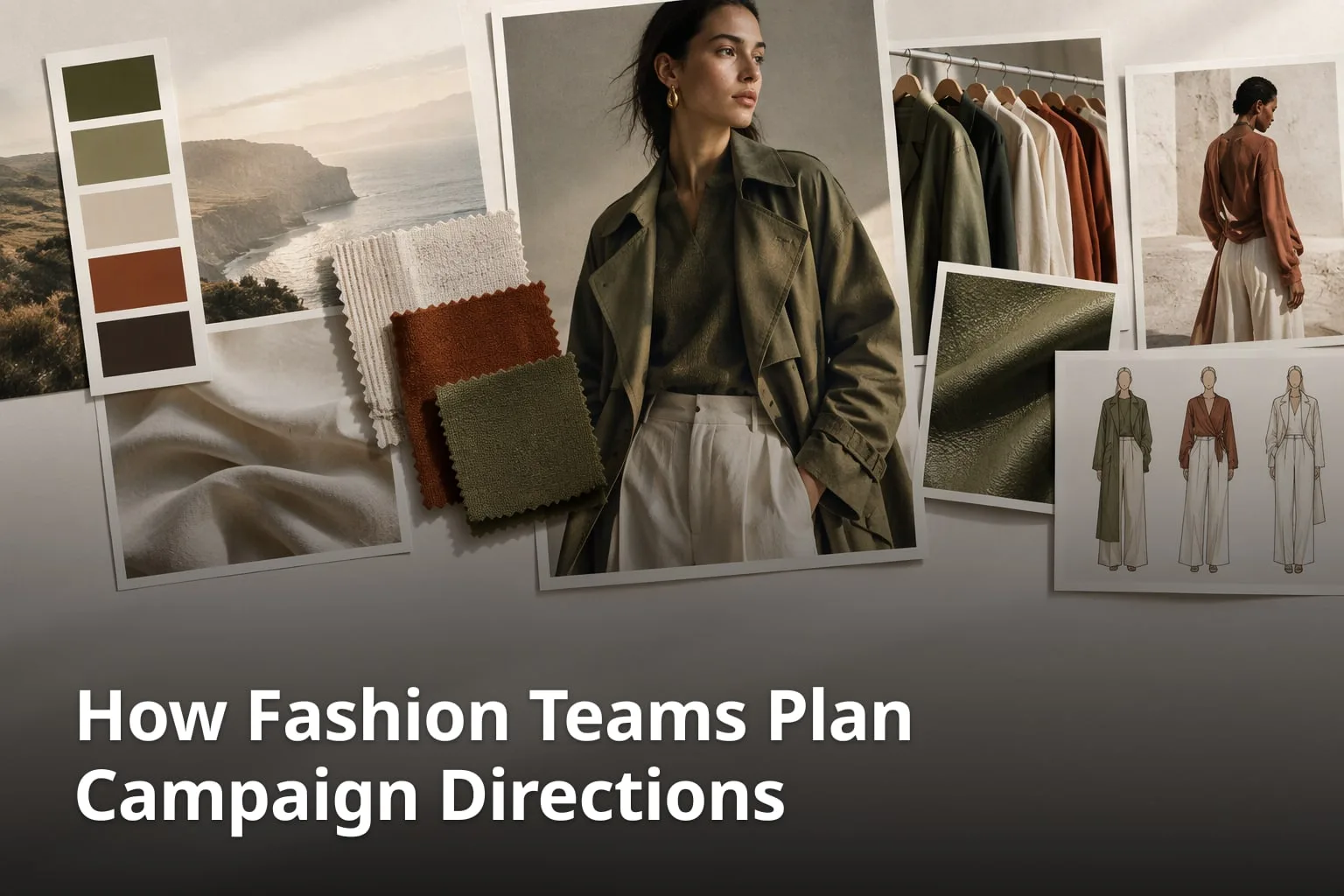
A campaign direction is the set of decisions that tells everyone what a fashion campaign should look and feel like before anything is shot or edited. This guide walks through how a team can build one from colorways, materials, and styling references: what to collect, how to write the direction down, how AI image tools can help explore options, how to compare and agree on a direction, and how to hand it over to production. It draws on checklists from other fashion and production companies, which are named where they are used, and on what Enterall itself describes on its site and in its journal.
What is a fashion campaign direction?
A fashion campaign direction is the agreed creative plan for a campaign: the concept, the mood, the color direction and the styling that the imagery will follow. It gives designers, stylists, photographers and producers one reference to work from.
Phil Halfmann Photography, in a campaign planning checklist for fashion brands, lists approving the "concept, mood board, color direction and styling" as part of the production step, and the same checklist asks that the business goal shapes the creative brief. In other words, the direction is something a team decides and signs off, not just a pile of inspiration.
A direction is easiest to agree on when it is concrete. A mood board, a few colorways, material references and styling examples can all be looked at, compared and approved. A sentence such as "modern and warm" leaves room for several readings.
What does a campaign direction usually contain?
- The goal of the campaign and the audience it is for.
- A mood board of references: images, sketches, textures and palettes.
- The color direction, including the colorways that will be shown.
- Material and finish references that show how the garments should look and feel.
- Styling references: models, poses, locations and props.
- A short written statement of the direction and the reasons behind it.
Why do colorways, materials, and styling references matter?
Colorways, materials, and styling references are the three inputs that the campaign imagery depends on most directly, and each can be shown, compared and approved. Settling them early gives everyone the same picture of the result.
A colorway is a color treatment applied to a product or design direction. Materials and finishes show how a garment should read in an image, for example its texture and surface. Styling references show the context: who wears the garment, how it is combined with other pieces and where it appears. Together they turn a general idea into something a photographer, retoucher or art director can act on.
Because each of these can change a lot between one option and the next, a team gains from keeping the options side by side. That is also where visual tools help: it is easier to judge three colorways of the same garment when they sit next to each other and next to the references that inspired them.
How do you collect references for a campaign direction?
Start with one place for everything: one board per campaign, with the references, sketches, palettes and notes that point the work in the right direction. Enterall's journal suggests creating one board per project for a collection, capsule or campaign.
1. Create one board for the campaign
Make a single board for the campaign so references do not end up scattered across folders and message threads. Enterall describes boards as the place where you can collect references, sketches, colour palettes, images, text and documents on a shared canvas.
2. Add your own references
Upload sketches, product photos and reference images. On its home page, Enterall says you can upload sketches, product photos and reference images to a board, and in its FAQ that you keep your rights to the images you upload.
3. Add palettes and notes
Add color palettes and short notes about the season mood, the customer, the price level and what to avoid. Enterall's journal gives these as examples of what to record next to the images.
4. Group the references by theme
Group images by theme, for example silhouette, fabric, color and finish. Grouping makes it easier to see which references belong to the same idea and which point in different directions.
5. Record decisions beside the images
Write down what you decided and why, next to the images it concerns. Enterall's journal suggests keeping the reason beside the image so it can feed the rationale in the brief later.
A board is a working surface, not a finished direction. Keep the references you rejected as well as the ones you chose, since the rejected ones often explain why the chosen direction looks the way it does.
How do you write the campaign direction down?
Write the direction as a short brief that links back to the references. A brief turns the board into something that people outside the creative team can read, comment on and approve.
Enterall's journal lists what a creative brief can contain as general advice: the project name and purpose, the audience and where they will see the work, the visual direction with palette, materials and silhouettes linked to board images, the deliverables and their format, constraints such as budget and quantities, a timeline with dates for reviews and final delivery, roles for who decides and who gives feedback, and open questions.
Phil Halfmann Photography's checklist adds a production angle: it asks you to map every deliverable before production and to build the brief, shot list, call sheet and approval workflow. It also asks you to mark every shot as must-have, supporting or experimental, which is a simple way to tell the production team where the direction is fixed and where it is open.
What should the written direction answer?
- What is the business goal of the campaign?
- Who is the audience, and where will they see it?
- Which colorways and materials will be shown?
- What do the styling, models and locations look like?
- What is fixed, and what is still open?
- Who approves, and by when?
How can AI help explore colorways, materials, and styling?
AI image tools let a team test several colorways, materials or styling options from a reference before committing to a direction. They are best treated as a way to explore, with a person reviewing every result against the real product.
Enterall describes AI image tools for turning sketches into rendered concepts, exploring colourways and alternative materials on the same design, refining length and details, and creating packshot-style images. You can also edit an existing image to develop a specific detail or try another direction, and Enterall's journal advises describing one change at a time, for example a new color or a different fabric, and using the board palette as the reference.
Enterall's product guidance is clear about limits. Results should be reviewed for visual and factual accuracy. Using a reference improves the direction but does not guarantee that the source image is preserved exactly, and small product, material, construction, text or identity details can change. Enterall's terms also warn that "AI results may contain errors" and ask users to review results before relying on them or using them commercially. For a campaign, that means checking trims, seams, logos and materials against the real garment.
The Bridges AI, a company that produces AI and hybrid campaigns and has a commercial interest in the subject, writes that AI lets brands "create environments that would otherwise be complex or expensive to produce physically" and that it can be used to test visual directions before committing to full-scale production. The same article lists limits: AI "struggles with" complex fabric physics and transparent or reflective materials, and without strong art direction the visuals can appear generic or inconsistent with brand identity. It also lists disclosure requirements among the legal and ethical concerns.
How can a team keep AI exploration under control?
- Write the direction before you generate, so the results can be judged against it.
- Change one thing at a time, such as a color or a fabric.
- Compare results with the original reference, checking proportions, trims, edges and color before mood.
- Discard mismatches instead of trying to rescue them.
- Check construction details against the real garment before commercial use.
- Record why the chosen image won.
How do teams compare options and align on a direction?
Teams align by putting the options next to each other, judging them against the same goals and recording the decision and its reason. Enterall's journal sets out six steps for comparing creative concepts, and they work as well for campaign directions.
1. Set goals first
Define the audience, the intended message, the mood and practical limits such as budget, materials or season before you compare anything.
2. Group material by concept
Keep each direction's references, sketches, feedback and iterations together, with consistent names and version labels.
3. Present the concepts equally
Show each concept at the same size and with the same amount of explanation, side by side, so one does not win simply by being presented better.
4. Score the concepts against the goals
Rate each concept on originality, feasibility and brand fit, with a short written note for each criterion.
5. Gather varied input
Ask design, production, merchandising and the client to review, and keep the comments together with the concept they concern.
6. Record the decision
Note why the chosen direction was picked and why the others were not, and keep that note with the board.
Review rounds work better with clear roles. Enterall's journal suggests defining who reviews and who makes the final call, with a deadline for each round, asking reviewers to name the criterion and point to the specific reference, and summarizing feedback after each round with each point marked as accepted, declined or postponed.
Sharing is part of the process. Enterall lets you invite collaborators to work on a board in real time, or enable a share link and choose whether people with the link can view or edit. Its journal advises giving editors and viewers different permissions before you share. Enterall's terms also note that content shared with collaborators or public viewers may be received or copied by them, so think about who sees unreleased material.
How do you move from direction to production planning?
Once the direction is approved, turn it into a plan: list the deliverables, set the dates and decide who approves what. Phil Halfmann Photography's checklist says to map every deliverable before production, and gives the order of the steps a campaign typically runs through: business goal, audience, strategy, deliverables, budget, production, deployment, tracking, content library and review.
On timing, the same checklist says that for a multi-channel collection launch, planning should begin 8–12 weeks before launch, and that larger productions, talent bookings, custom sets or complex licensing may need more lead time. It also says to build the content calendar, landing pages, email sequence, paid-media plan and approval schedule while post-production is underway. These are one photographer's recommendations, not a standard, so adjust them to your own team and channels.
KapleApparel, an apparel manufacturer, lists preparing content and launch assets as a step that runs in parallel with production in its apparel production timeline. The point for a campaign team is the same: the campaign work does not have to wait until the garments are finished, as long as the direction is clear.
Enterall's product guidance describes documents, tables, calendars and presentations that can sit alongside the board, so that a brief, a shot list, a schedule and a client presentation stay close to the visual direction. Which of these you need depends on your team. A small team may only need the board and a short document.
What belongs in a production hand-off?
- The approved direction and the references behind it.
- The list of deliverables and their formats.
- The shot list, with each shot marked must-have, supporting or experimental.
- Dates for shoots, reviews and delivery.
- Owners for production, retouching, review and final approval.
- Notes on what was rejected and why.
How does Enterall support a campaign direction workflow?
Enterall is a visual workspace for fashion and apparel designers, from independent creatives to teams. Its pages describe boards for references, AI image tools, real-time collaboration and share links, which cover the collect, explore and share parts of a campaign direction.
On a board you can collect references, sketches, colour palettes and notes. The AI image tools can turn sketches into rendered concepts, explore colourways and alternative materials, show a design on a model and create packshot-style images. You can combine references, build outfits and edit existing images. Images can be downloaded from the board for presentations, briefs or shop systems. Everything runs in the browser, and Enterall says that no AI experience or special software is needed.
Enterall lets you connect an AI assistant, for example ChatGPT or Claude, through MCP. According to its journal, a connected assistant can find boards, group images, create documents and add comments to board shapes. You approve what it does, and board, document and collaboration tools are free, while image generation and editing use credits.
Enterall also offers a Custom Board: you submit links and Enterall builds a tailored board for you. The page says to expect the board within 48 hours and states that the service is completely free.
What does Enterall describe for this workflow?
- Boards for references, sketches, colour palettes, images, text and documents.
- AI tools for rendered concepts, colourways, materials, details and packshot-style images.
- Real-time collaboration and share links set to view or edit.
- Image downloads for presentations, briefs or shop systems.
- A connected AI assistant through MCP.
- Credits for image generation and editing.
What does it cost to try Enterall?
Enterall says it is free to start, with no credit card required. Its pricing page lists a Free plan with 200 credits given once, Starter at 150 DKK per month with 1,000 credits per month, and Pro at 500 DKK per month with 6,000 credits per month, plus a custom Enterprise plan. These were the figures on the pricing page in November 2026, and prices can change.
Starter and Pro credits renew monthly and unused credits do not roll over. Credit use depends on the tool and the output chosen, so how far the credits go varies. Enterall's journal suggests testing a real project on the Free plan to see how credits are used before you decide.
How can you test this on a small campaign?
Pick a small project, set a short direction and run one review round. Enterall's journal suggests a pilot with a real sketch, a two-to-three-sentence direction, two or three colorways, one review round and one final export.
Afterward, look at where the time went. If most of it went into finding references, the board is doing its job. If it went into writing instructions for the AI tools, a clearer written direction would help most. Use the answer to decide how much of the process to move into a shared workspace.
What does a small pilot involve?
- One real sketch or product photo as the starting point.
- A direction of two or three sentences, written before you generate anything.
- Two or three colorways to compare against the original.
- One review round with clear feedback on color, material or styling.
- One final export, with the reason for the choice recorded.
What are common questions about planning campaign directions?
Here are answers to a few common questions, with figures from the sources named at the end of the article.
What is the first step in planning a fashion campaign direction?
Define the business goal and the audience, then gather references: colorways, materials and styling examples. Phil Halfmann Photography's checklist starts with one primary commercial objective before the creative idea, and Enterall's journal suggests one board per campaign.
How early should campaign planning begin?
It depends on the campaign. Phil Halfmann Photography says that for a multi-channel collection launch, planning should begin 8–12 weeks before launch, and that larger productions may need more lead time.
How can AI tools help with a campaign direction?
They can produce variations of a reference in different colorways, materials or styling, so a team can compare options before committing. Results should be reviewed, since small details can change and a reference does not guarantee exact preservation.
How do teams agree on a direction?
They compare options side by side against the same goals, gather input from design, production and the client, and record why one direction was chosen. Enterall's journal describes six steps for this.
Can I share a board with a client?
Yes, you can invite collaborators to work on a board in real time, or enable a share link and set whether people with the link can view or edit. Think about who should see unreleased material before you share.
Is there a free way to try this?
You can start for free with no credit card. The Free plan includes 200 credits given once, and the paid plans start at 150 DKK per month, as listed on the pricing page in November 2026.
Want to try this on your next campaign? Start a board with your references, colorways and notes, and see how far you get on the Free plan. Try Enterall
What are the sources?
This article draws on Enterall's own pages and journal, and on pages from Phil Halfmann Photography, The Bridges AI and KapleApparel.
Which sources were used?
- Enterall: https://enterall.co
- Enterall pricing: https://enterall.co/pricing
- Enterall Custom Board: https://enterall.co/custom-board
- Enterall journal, How to turn a fashion moodboard into a creative brief: https://enterall.co/blog/news/how-to-turn-a-fashion-moodboard-into-a-creative-brief-with-enterall
- Enterall journal, Compare creative concepts without losing references: https://enterall.co/blog/news/compare-creative-concepts-without-losing-references
- Enterall journal, AI image workflow for creative teams: https://enterall.co/blog/news/ai-image-workflow-for-creative-teams
- Enterall journal, A visual workspace for apparel and fashion teams: https://enterall.co/blog/news/enterall-a-visual-workspace-for-apparel-and-fashion-teams
- Phil Halfmann Photography, Fashion marketing checklist: https://philhalfmann.com/fashion-marketing-checklist-the-complete-guide-to-planning-campaigns-that-drive-sales/
- The Bridges AI, AI in fashion campaigns: https://www.thebridges.ai/post/ai-in-fashion-campaigns-opportunities-limits-and-strategic-use
- KapleApparel, Apparel production timeline: https://kapleapparel.com/blogs/news/apparel-production-timeline-design-to-launch