
Turn Fashion Sketches into Realistic Visuals
Learn the steps to transform fashion sketches into realistic visual directions and collaborate effectively using Enterall’s tools.
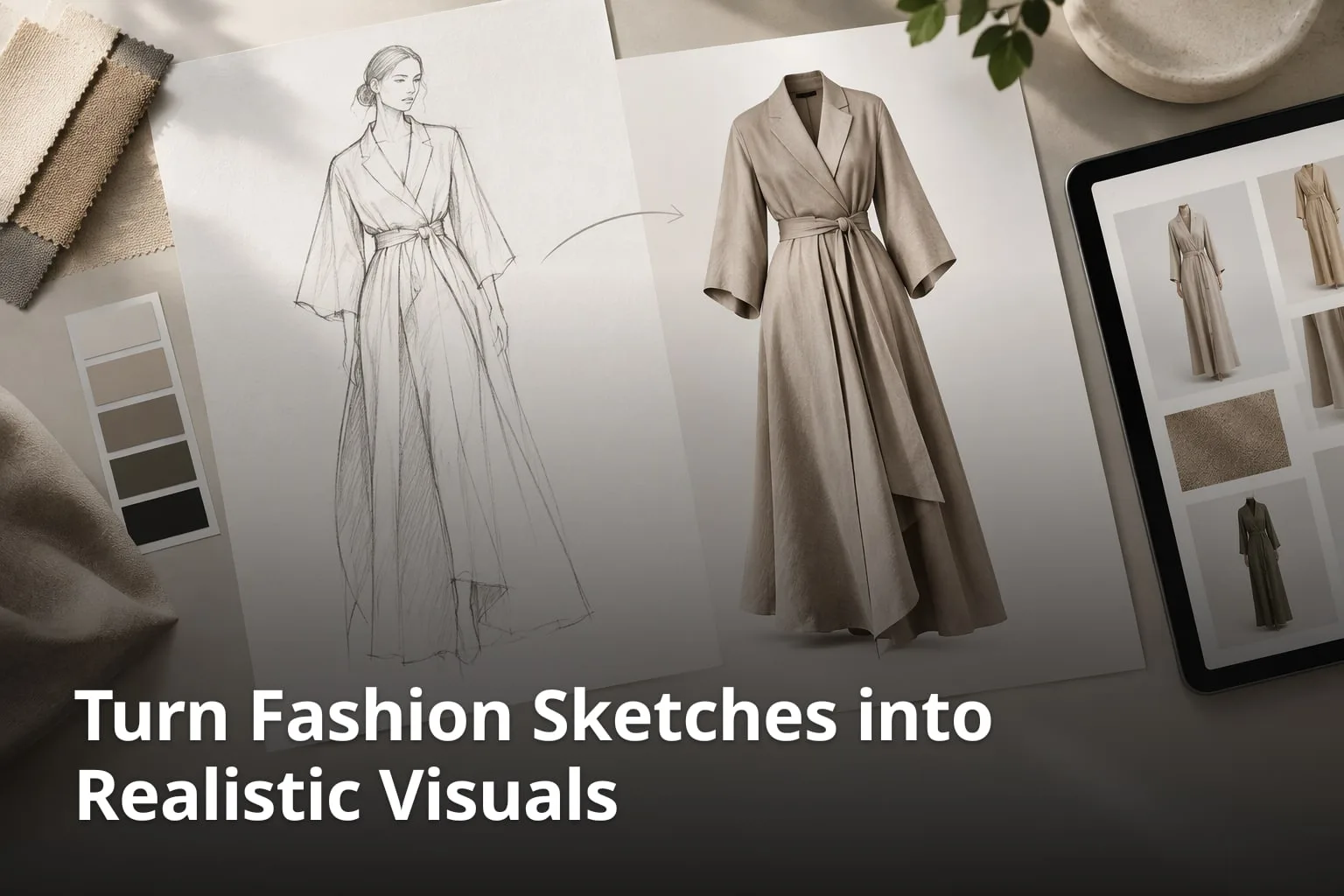
Turning a fashion sketch into a realistic visual direction is an important step in the design process. With AI tools and a clear workflow, designers can move from an initial sketch to a more resolved visual interpretation. This article walks through the process, explaining how to use AI tools and collaboration methods to refine your ideas, and how Enterall's boards can support each step.
What is the process for turning a fashion sketch into a realistic visual direction?
The process involves starting with a sketch or reference, refining it using AI tools, and iterating toward a polished visual. Collaboration and review are key to ensuring accuracy in details like construction and identity.
Key Takeaways: What does the process involve?
- Begin with a clear sketch or reference image to define your concept.
- Use AI tools to generate polished visuals based on your input.
- Refine details such as colors, textures, and proportions.
- Compare multiple visual options to identify the strongest direction.
- Collaborate with your team for feedback and finalization.
Developing a realistic visual direction from a sketch begins with a well-defined concept. Designers can use AI tools to create more resolved visual interpretations of their ideas. Iterating this way lets teams refine details and check the concept against their goals.
How to refine your fashion sketch into a visual concept?
1. Start with a clear sketch or reference image
Begin by creating or selecting a clean, detailed sketch that encapsulates your design concept. This can be a hand-drawn illustration or a digital sketch created using design software. Ensure the sketch highlights essential features like patterns, textures, and silhouettes.
2. Upload your sketch to an AI-powered design tool
Choose an AI tool that allows you to upload your sketch and begin the transformation process. Many tools offer features such as colorway exploration and material changes to make your design look more realistic.
3. Define your desired visual outcomes
Specify the changes you want to see in your design, including color palettes, materials, or styling adjustments. Clear instructions can help the AI generate visuals that are closer to your creative vision.
4. Generate and review multiple variations
Use the tool to create several versions of your design. This step allows you to explore different directions, compare variations side-by-side, and identify the one that best aligns with your vision and brand identity.
5. Collaborate and finalize your design
Invite your team to review the created visuals. Share the board containing all the variations and gather feedback on construction details, proportions, and overall aesthetics. This ensures that your final visual direction is cohesive and ready for production.
Tip: Keep your original sketch and reference materials easily accessible within your board. They provide essential context and help ensure the AI-generated visuals stay true to your initial concept.
How do AI tools help refine fashion sketches?
AI tools can generate more resolved visuals from sketches, helping designers explore variations, refine details, and visualize concepts.
Key Takeaways: How do AI tools benefit fashion sketch refinement?
- AI can add polish to rough sketches, making them look more resolved.
- Tools allow for quick exploration of colorways, materials, and styles.
- AI-generated visuals help communicate a creative direction.
- Make focused edits to colors, materials, or backgrounds.
- Keep the connection between the original sketch and the result.
AI tools can turn rough ideas into more polished visuals. Designers can explore colors, materials, and styles on screen before making physical samples.
How to use AI tools effectively for sketch refinement?
1. Choose an AI tool designed for fashion workflows
Select a platform that supports sketch-to-image transformation and offers features tailored for apparel design. These tools typically include built-in workflows for creating realistic visuals from sketches.
2. Upload your sketch and configure settings
Start by uploading your sketch and setting parameters for the AI processing. Input details like preferred styles, materials, or textures to guide the visual refinement process.
3. Generate multiple options for comparison
Run the AI tool to produce several variations of your design. Compare these options to identify the one that best aligns with your requirements and vision.
4. Iterate and finalize your design
Refine your selected option by making adjustments and adding finishing touches. Use the result as creative direction rather than as a production specification, and review it carefully before it goes further.
Warning: AI tools are powerful, but they can sometimes introduce unintended changes. Always review results carefully to ensure accuracy and fidelity to your initial sketch.
What should you consider when refining a fashion sketch?
Key considerations include maintaining the integrity of the original design, ensuring accuracy in construction details, and aligning the visual with the intended aesthetic and brand identity. These steps are crucial to ensure the final product meets creative and commercial expectations.
1. Evaluate the proportions and design elements.
Start by examining your original sketch to ensure the proportions and design elements are accurate. Focus on critical aspects such as symmetry, balance, and proportion to maintain the integrity of your design. Use AI tools to enhance and refine these features while staying true to the initial concept.
2. Align the visual with the brand identity.
Determine how the refined sketch fits within the broader context of your brand’s aesthetic and market positioning. Consider aspects like color schemes, stylistic consistency, and target audience preferences. Adjust the visual using tools to ensure it resonates with your brand.
3. Focus on material and construction details.
Pay close attention to the texture, fabric, and trims within the sketch. If necessary, use AI tools to explore material changes. This helps the final image reflect the qualities of the intended materials, but always check the result against the original sketch.
4. Collaborate with stakeholders.
Share the refined sketch on a collaborative visual workspace to get feedback from designers, marketers, and other stakeholders. Their insights can help identify any discrepancies and ensure the visual meets both creative and commercial goals.
5. Review and finalize the visual.
Perform a final review of the refined visual to ensure it meets all design, aesthetic, and commercial requirements. Verify that the image is consistent with the original sketch, and make any necessary adjustments before proceeding with production or presentation.
Tip: Double-check for any visual inconsistencies that could misrepresent your design. Use high-resolution tools to zoom in and refine minor details.
How do you compare visual options effectively?
To compare visual options effectively, use side-by-side comparisons, annotate strengths and weaknesses, and involve collaborators for diverse perspectives. This structured approach helps you select the most accurate and appealing design.
1. Generate multiple variations of your design.
Use AI tools or manual adjustments to create several iterations of your fashion sketch. Consider experimenting with different colors, textures, or design elements to explore multiple directions for your design.
2. Organize visuals on a comparison board.
Place your different visual options side by side on a collaborative board. This layout allows you to assess the similarities and differences between each option and how well each aligns with your design goals.
3. Annotate strengths and weaknesses.
Add comments or annotations to highlight the pros and cons of each visual. Note areas where the design excels, as well as aspects that may need refinement or adjustments.
4. Seek feedback from collaborators.
Invite your team or stakeholders to review the visual options on the board. Their insights can help identify which designs resonate most with the intended audience or fulfill the project requirements.
5. Select the final design direction.
Based on your analysis and team feedback, choose the visual that best captures the design vision. Ensure it is polished and ready for further development or presentation.
Tip: Use high-resolution displays for comparisons to discern subtle differences in textures, colors, and details.
What are the limitations of AI-generated visuals?
AI-generated visuals may vary in accuracy and require review for details like construction, material consistency, and identity alignment. Collaboration and manual adjustments are often necessary to achieve the desired output.
What are the key details to consider?
- AI tools may not perfectly capture intricate design details.
- Generated visuals can lack consistency in materials and proportions.
- Small construction details may need manual refinement.
- AI results depend on input quality and defined parameters.
- Always review and adjust visuals before finalizing.
Before committing to an AI-generated visual, ensure comprehensive review for material accuracy, design integrity, and alignment with intended aesthetic goals.
How can Enterall help with fashion sketch refinement?
Enterall is a collaborative visual workspace where creative teams collect references, develop and edit images with AI, and turn the same board into briefs, plans, presentations, and shared client work. Reference collection, image generation, and collaborative feedback live on one board.
What are the key details to consider?
- Use Enterall's boards to collect and organize references.
- Generate and edit visuals with Enterall's AI tools.
- Compare and refine options within the same workspace.
- Collaborate with teams using comments and shared boards.
- Turn board material into briefs and production notes.
1. Start by uploading your fashion sketch to Enterall.
Create a new board in Enterall and upload your sketch as the starting point for your design process. Add reference images, mood boards, and notes to establish the creative direction.
2. Generate realistic visuals with AI tools.
Use Enterall's AI image tools to transform your sketch into a more resolved visual. Change elements like color, material, or styling to match the intended design concept.
3. Compare and refine generated options.
Evaluate the AI-generated visuals on your board and compare iterations beside the original. Review proportions and construction details carefully, and generate further variations where a detail needs to change.
4. Collaborate with your team for feedback.
Share your board with collaborators to gather feedback. Real-time presence and comments attached to the relevant material let the team respond on the same board.
5. Turn the polished visual into production-ready documents.
Use Enterall's document tools to create briefs, production notes, or plans from the board, so the written context stays connected to the visuals.
Enterall keeps the work connected from sketch refinement to briefs and plans, so the creative context stays on the same board.
What steps should you take after generating a realistic visual direction?
After generating a visual direction, review construction details, align collaborators, and finalize the image for production or presentation purposes. These steps help you check the details of the visual before it is used.
1. Review and refine construction details.
Carefully examine the generated visual for precise details, including edges, seams, trims, and proportions. This step ensures that the design aligns with the intended specifications and aesthetic qualities. If necessary, use Enterall’s image editing tools to make adjustments and achieve the desired look.
2. Validate the design aesthetic.
Double-check that the visual representation matches the creative vision and brand identity. This includes confirming the accuracy of colors, materials, and the overall harmony of the design elements. Use reference materials on the board to compare and validate the direction.
3. Share and gather feedback.
Distribute the visual board to collaborators or stakeholders for their input. Sharing and commenting on the board let teams discuss and suggest improvements in context.
4. Use tools to create production notes or briefs.
You can turn the finalized visual direction into a brief or production notes on the same board, so the visual context stays attached to the written plan.
5. Prepare visuals for commercial or client use.
Once the design is finalized and approved, you can download images from your board for client presentations or your wider design workflow. The creative decisions stay on the board for reference.
How can teams collaborate effectively on visual boards?
Teams can collaborate effectively by sharing boards, commenting on visuals, and comparing options in Enterall's workspace, which keeps everyone working from the same creative direction.
1. Invite collaborators to join the process.
Use Enterall's sharing features to invite team members to your visual board. Share links let you control whether people with the link can view or edit the board, so everyone can contribute in the right way.
2. Use comments to refine ideas.
Enterall lets collaborators add contextual comments directly on the visual board. This feature is crucial for discussing details, exploring alternatives, and ensuring that all feedback is captured in one place for easy reference.
3. Compare and annotate visual options
On a board you can place multiple design options side by side and annotate the differences. This makes it easier to clarify the strengths and weaknesses of each option and align on a creative direction.
4. Turn boards into documents.
Once the visual direction is aligned, turn board material into documents such as briefs. This keeps communication with manufacturers, clients, or other stakeholders connected to the visual context.
5. Work together in real time
Teams can work together in real time, share boards with clients or other external reviewers, and keep the evolving creative direction on one board that everyone can access.
Related reading: Enterall for Fashion Design Workflows in 2026 and From Moodboard to Creative Brief with Enterall.
Frequently Asked Questions
Can AI create realistic visuals from any sketch?
AI tools can work from many sketches, but the quality of the input and the defined parameters will influence the results. Complex designs may require manual adjustments.
What details should I review in AI-generated visuals?
Review construction details, material consistency, proportions, and alignment with the intended design vision. Ensure the final visual meets commercial and aesthetic requirements.
How does Enterall differ from other tools?
As a collaborative visual workspace, Enterall keeps references, AI image development, planning, and review on one board instead of only generating images.
Can Enterall refine sketches for fashion campaigns?
Yes. You can upload a sketch to a board, turn it into rendered concepts with AI, and then collaborate and plan on the same board.
What are the benefits of comparing visual options on a board?
Comparing visual options on a board helps teams identify the strongest direction, annotate differences, and ensure alignment before finalizing the design.
Does Enterall support collaboration with external clients?
Boards can be shared through share links, with settings that control whether people with the link can view or edit. The exact access a guest has depends on the sharing mode.
Start turning your fashion sketches into realistic visuals today with Enterall's collaborative workspace. Create your account